Dev Centre House Ireland Company LogoDev Centre House Ireland
  • About Us
  • Services
  • Technologies
  • Industries
  • Case Studies
  • Startup Program
Dev Centre House Ireland Company LogoDev Centre House Ireland
  • Contact Us
  • [email protected]
  • +353 1 531 4791

FOLLOW US

LinkedIn iconFacebook iconX iconClutch icon

Services

  • Custom Software Development
  • Web Development
  • Web Design
  • Mobile App Development
  • Artificial Intelligence (AI)
  • Cloud Development
  • UI/UX Design
  • DevOps
  • Machine Learning
  • Big Data
  • Blockchain
  • Explore all Services

Technologies

  • Front-end
  • React
  • Back-end
  • Java
  • Mobile
  • iOS
  • Cloud
  • AWS
  • ERP&CRM
  • SAP
  • Explore all Technologies

Industries

  • Finance
  • E-Commerce
  • Telecommunications
  • Retail
  • Real Estate
  • Manufacturing
  • Government
  • Healthcare
  • Education
  • Explore all Industries

Quick Navigation

  • About Us
  • Services
  • Technologies
  • Industries
  • Case Studies
  • Exclusive Partnership Program
  • Careers [We're Hiring!]
  • Blogs
  • Privacy Policy
  • InvestOrNot – Company checker for investors
  • Norway (Oslo)
© 2026 Dev Centre House Ireland All Rights Reserved
Flag of IrelandRepublic of Ireland
Flag of European UnionEuropean Union
Back to Blog
Technology

Pagination and Filtering in NestJS APIs

Anthony Mc Cann
Anthony Mc Cann
16 May 2025
3 min read
Pagination and Filtering in NestJS APIs

Table of contents

  • Why Pagination and Filtering Matter
  • Setting Up a NestJS Project
  • Building a Products Endpoint
  • Adding Pagination to the API
  • Adding Filtering to the API
  • Best Practices
  • Final Thoughts

APIs are the backbone of modern applications. But as your data grows, returning everything in one go becomes inefficient—and even dangerous. That’s where pagination and filtering in NestJS come in. With these tools, you can control how much data is sent to clients and allow them to query exactly what they need. In this guide, you’ll learn how to […]

APIs are the backbone of modern applications. But as your data grows, returning everything in one go becomes inefficient—and even dangerous. That’s where pagination and filtering in NestJS come in. With these tools, you can control how much data is sent to clients and allow them to query exactly what they need.

In this guide, you’ll learn how to implement pagination and filtering in your NestJS REST APIs like a pro.

Why Pagination and Filtering Matter

Imagine an e-commerce app listing thousands of products. Without pagination, every API request could pull in all product records, slowing down the frontend and overloading the server.

Filtering, on the other hand, empowers users to narrow down results—like searching for products under a certain price, in a specific category, or created within a date range.

Together, these features create better user experiences and keep your system performant.

Setting Up a NestJS Project

If you don’t already have a NestJS app:

Let’s assume you’re working with a simple ProductsModule.

Building a Products Endpoint

Start by generating a product module, service, and controller:

Now we’ll add a basic Product entity and work on a service that returns mock data (or integrates with a database like PostgreSQL or MongoDB).

Adding Pagination to the API

We’ll support page and limit as query parameters.
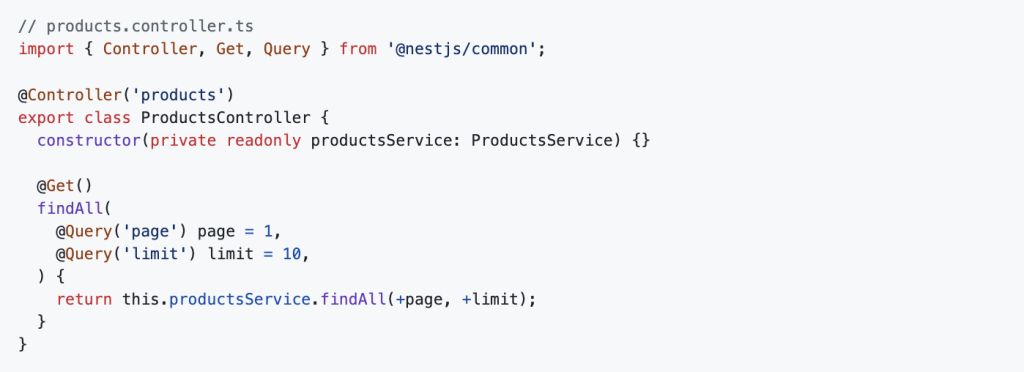
Now implement it in the service:
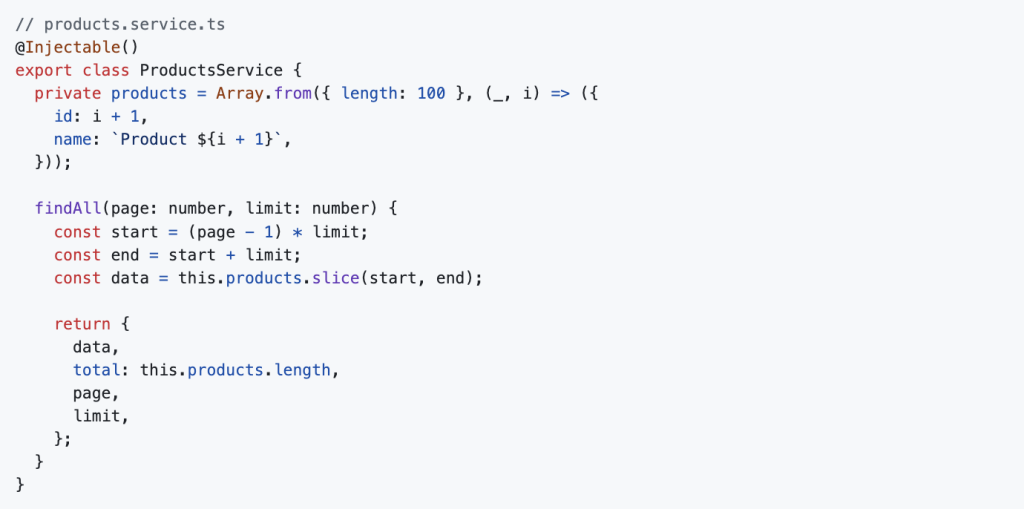
This returns paginated results, along with total count, current page, and limit. You can use this structure to build pagination UIs easily.

Adding Filtering to the API

Now let’s enhance it by adding filtering. Suppose your product has category and price fields.

Update the controller to accept filters:
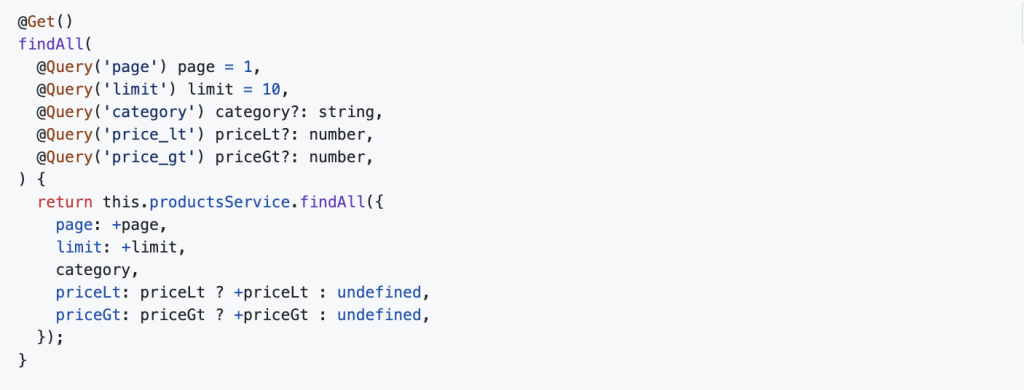
Update the service accordingly:
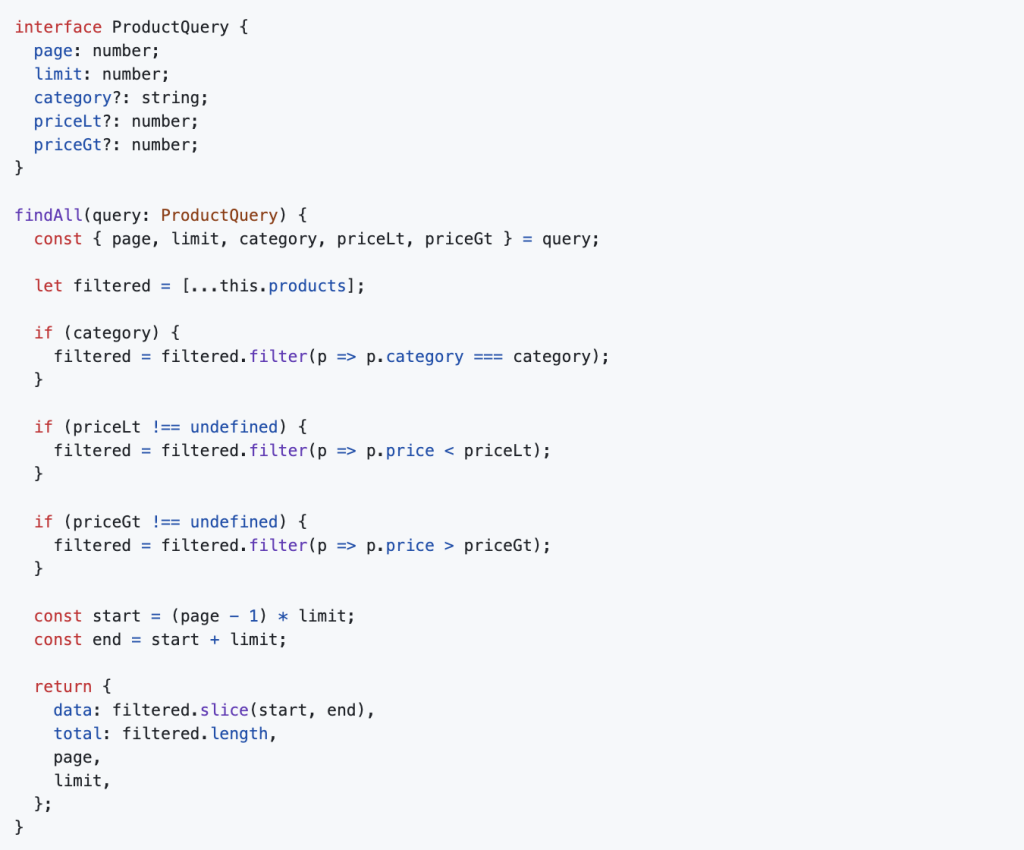
Now you can call:

And get a filtered, paginated response!

Best Practices

  • Set max limit: Avoid abuse by restricting the limit to something like 100 max.
  • Use DTOs: For validation, create a DTO with decorators like @IsOptional(), @IsInt(), and use @Query() with ValidationPipe.
  • Cache frequent queries: Use in-memory caching (like Redis) for frequently repeated filters.
  • Use pagination metadata: Include total count, current page, next/prev flags, etc.

Final Thoughts
Pagination and filtering in NestJS make your APIs more flexible, efficient, and user-friendly. They’re essential tools for any backend developer building scalable applications.

Whether you’re working with REST or GraphQL, implementing these features early can save a lot of pain later.

Want to see how real-world applications structure scalable backends with NestJS and Node.js? Check out this backend tech stack from Dev Centre House Ireland for inspiration.

Share
Anthony Mc Cann
Anthony Mc CannDev Centre House Ireland

Table of contents

  • Why Pagination and Filtering Matter
  • Setting Up a NestJS Project
  • Building a Products Endpoint
  • Adding Pagination to the API
  • Adding Filtering to the API
  • Best Practices
  • Final Thoughts

Free Consultation

Have a project in mind? Let's talk.

Our engineers help businesses build scalable software — from MVP to enterprise. Book a free 30-min session.

Related Articles

View all →
Why Business Owners in Limerick Should Always Plan for Scalability from Day One
Technology

Why Business Owners in Limerick Should Always Plan for Scalability from Day One

Anthony Mc Cann28 January 2026
Why Dublin Startups Should Rethink IT Consultancy Before Their Next Project
Technology

Why Dublin Startups Should Rethink IT Consultancy Before Their Next Project

Anthony Mc Cann4 December 2025
The Future of Software Delivery Pipelines in an AI Supported Engineering World in Galway
Artifical Intelligence

The Future of Software Delivery Pipelines in an AI Supported Engineering World in Galway

Anthony Mc Cann4 December 2025

Contact Us!

Fill out the form below or schedule a call and we will be in touch. * indicates a required field.

Remaining Characters: 1000

By clicking Send, you agree to our Privacy Policy.

WHAT'S NEXT?

  1. 1

    We'll review your request, and start talking about your project.

  2. 2

    Our team creates a project proposal with timelines, costs, and team size.

  3. 3

    We meet, finalise the agreement, and begin your project.

Crunchbase badgeClutch badgeGoodFirms badgeTechBehemoths badge