Dev Centre House Ireland Company LogoDev Centre House Ireland
  • About Us
  • Services
  • Technologies
  • Industries
  • Case Studies
  • Startup Program
Dev Centre House Ireland Company LogoDev Centre House Ireland
  • Contact Us
  • [email protected]
  • +353 1 531 4791

FOLLOW US

LinkedIn iconFacebook iconX iconClutch icon

Services

  • Custom Software Development
  • Web Development
  • Web Design
  • Mobile App Development
  • Artificial Intelligence (AI)
  • Cloud Development
  • UI/UX Design
  • DevOps
  • Machine Learning
  • Big Data
  • Blockchain
  • Explore all Services

Technologies

  • Front-end
  • React
  • Back-end
  • Java
  • Mobile
  • iOS
  • Cloud
  • AWS
  • ERP&CRM
  • SAP
  • Explore all Technologies

Industries

  • Finance
  • E-Commerce
  • Telecommunications
  • Retail
  • Real Estate
  • Manufacturing
  • Government
  • Healthcare
  • Education
  • Explore all Industries

Quick Navigation

  • About Us
  • Services
  • Technologies
  • Industries
  • Case Studies
  • Exclusive Partnership Program
  • Careers [We're Hiring!]
  • Blogs
  • Privacy Policy
  • InvestOrNot – Company checker for investors
  • Norway (Oslo)
© 2026 Dev Centre House Ireland All Rights Reserved
Flag of IrelandRepublic of Ireland
Flag of European UnionEuropean Union
Back to Blog
Technology

File Uploads in NestJS Using Multer

Anthony Mc Cann
Anthony Mc Cann
16 May 2025
1 min read
File Uploads in NestJS Using Multer

Table of contents

  • Why Use Multer with NestJS?
  • Setting Up Your NestJS Project
  • Creating the Upload Module
  • Single File Upload
  • Multiple File Uploads
  • Validating File Types and Size
  • Serving Uploaded Files
  • Best Practices
  • Final Thoughts

Handling file uploads is a critical part of many web applications—from uploading profile pictures to processing documents. Fortunately, NestJS offers a clean and structured way to handle this using Multer, a powerful middleware for handling multipart/form-data. In this guide, you’ll learn how to implement file uploads in NestJS using Multer, including single and multiple file uploads, file validation, and storage […]

Handling file uploads is a critical part of many web applications—from uploading profile pictures to processing documents. Fortunately, NestJS offers a clean and structured way to handle this using Multer, a powerful middleware for handling multipart/form-data.

In this guide, you’ll learn how to implement file uploads in NestJS using Multer, including single and multiple file uploads, file validation, and storage configuration.

Why Use Multer with NestJS?

Multer integrates seamlessly with NestJS via the @nestjs/platform-express package. It allows you to control storage location, rename files, validate file types and sizes, and limit uploads per route—all while keeping your code modular and clean.

Setting Up Your NestJS Project

If you’re starting from scratch:

Install required packages:

Creating the Upload Module

First, create a module, controller, and service:

Now let’s dive into building the file upload feature.

Single File Upload

In your upload.controller.ts:
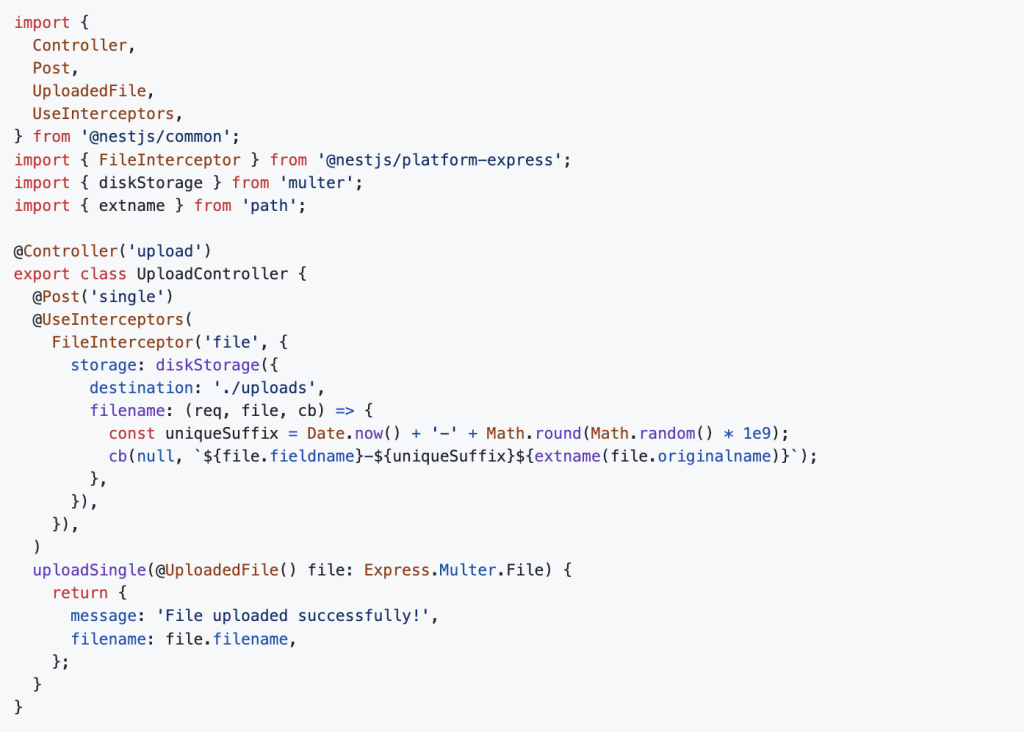
Make sure the uploads directory exists or handle its creation.

Multiple File Uploads

To upload more than one file:
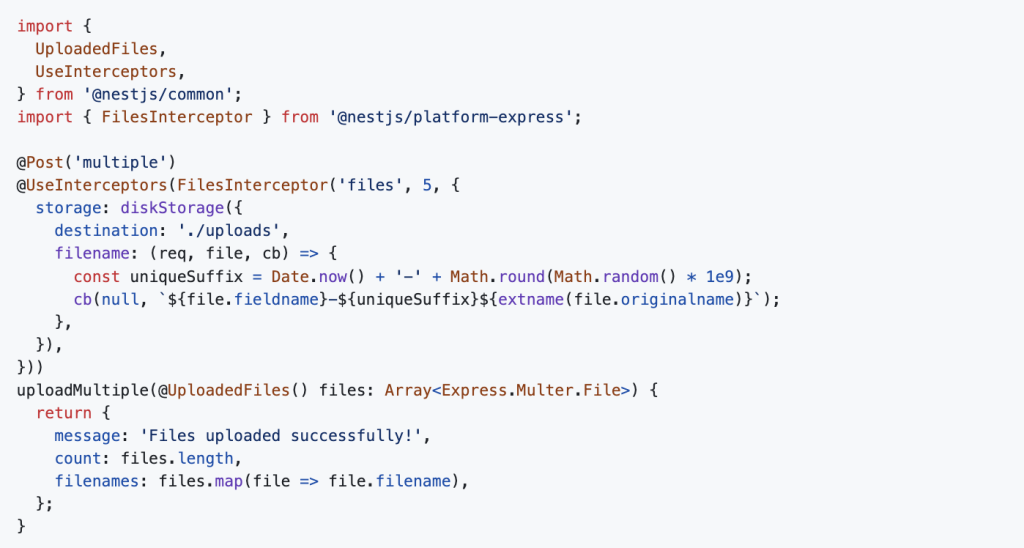
This limits the number of uploaded files to 5. You can change that number as needed.

Validating File Types and Size

Use the ParseFilePipeBuilder to add validation:
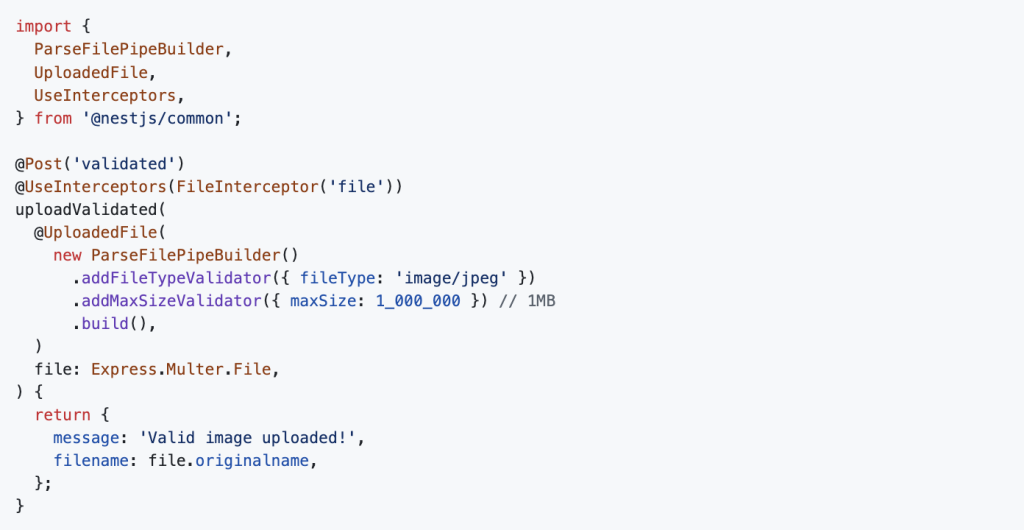
This ensures only .jpeg files under 1MB are accepted.

Serving Uploaded Files

To serve uploaded files, update main.ts:
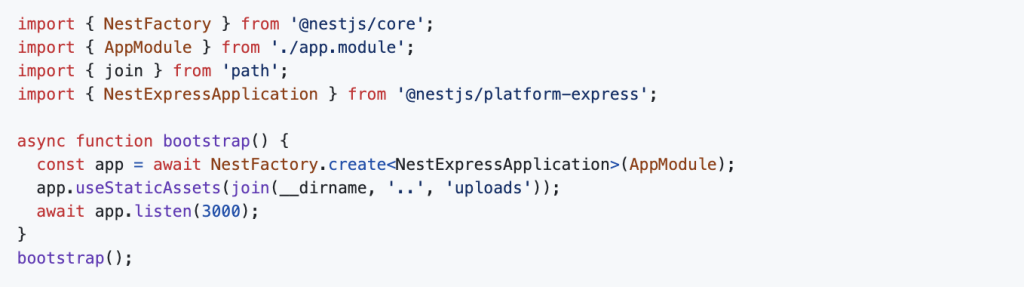
Now you can access uploaded files via http://localhost:3000/filename.

Best Practices

  • Store sensitive files in a protected folder, not public.
  • Use UUIDs or hash-based names to avoid collisions.
  • Move files to cloud storage like AWS S3 or Cloudinary for production.
  • Clean up old or unused files periodically.

Final Thoughts
Uploading files in NestJS using Multer is straightforward and flexible. You get full control over how files are stored, validated, and accessed—making it perfect for applications that need to handle user uploads reliably.

For more scalable backend solutions with NestJS and Node.js, check out this backend tech stack guide from Dev Centre House Ireland.

Share
Anthony Mc Cann
Anthony Mc CannDev Centre House Ireland

Table of contents

  • Why Use Multer with NestJS?
  • Setting Up Your NestJS Project
  • Creating the Upload Module
  • Single File Upload
  • Multiple File Uploads
  • Validating File Types and Size
  • Serving Uploaded Files
  • Best Practices
  • Final Thoughts

Free Consultation

Have a project in mind? Let's talk.

Our engineers help businesses build scalable software — from MVP to enterprise. Book a free 30-min session.

Related Articles

View all →
Why Business Owners in Limerick Should Always Plan for Scalability from Day One
Technology

Why Business Owners in Limerick Should Always Plan for Scalability from Day One

Anthony Mc Cann28 January 2026
Why Dublin Startups Should Rethink IT Consultancy Before Their Next Project
Technology

Why Dublin Startups Should Rethink IT Consultancy Before Their Next Project

Anthony Mc Cann4 December 2025
The Future of Software Delivery Pipelines in an AI Supported Engineering World in Galway
Artifical Intelligence

The Future of Software Delivery Pipelines in an AI Supported Engineering World in Galway

Anthony Mc Cann4 December 2025

Contact Us!

Fill out the form below or schedule a call and we will be in touch. * indicates a required field.

Remaining Characters: 1000

By clicking Send, you agree to our Privacy Policy.

WHAT'S NEXT?

  1. 1

    We'll review your request, and start talking about your project.

  2. 2

    Our team creates a project proposal with timelines, costs, and team size.

  3. 3

    We meet, finalise the agreement, and begin your project.

Crunchbase badgeClutch badgeGoodFirms badgeTechBehemoths badge