Learn how U.S. organisations can compare CMS platforms using practical criteria for content operations, integrations, scalability, security and long-term cost.
Choosing a content management system is not simply a web-design decision. It affects how quickly teams can publish, how reliably the site can scale, how much technical support is required, and how easily marketing, sales and operations can manage digital content over time. For a Business Website, the wrong platform can create avoidable costs, publishing bottlenecks and limitations when the organisation needs to add new channels, integrations or markets.
The best CMS for business is therefore not automatically the most popular platform or the option with the longest feature list. The right choice depends on how the site supports the organisation, who manages content, what systems must connect to it and how the platform is expected to evolve. This guide explains how to choose a CMS for a U.S. business website using practical business criteria rather than vendor popularity.
Start With the Role the Website Plays in the Business
A simple brochure site and a complex digital platform should not be evaluated in the same way. Before comparing products, define what the business website is expected to accomplish during the next two to four years.
For some organisations, the site mainly supports credibility and lead generation. Others need customer portals, product catalogues, gated resources, location-specific content or integrations with CRM, analytics and marketing automation.
A useful starting point is to document:
- audiences and user journeys;
- content ownership and approval;
- required page and content types;
- integrations and multi-site requirements;
- governance and publishing workflows;
- technical ownership and support.
This prevents the CMS selection from becoming a feature comparison that ignores the actual operating model. If you are also deciding between a packaged platform and a more tailored approach, the comparison between WordPress and custom website development can help frame the broader build-versus-configure decision.
Evaluate CMS Options Against Business Criteria
The phrase “best CMS for a website” can be misleading because different platforms optimise for different needs. A platform that works well for a small marketing team may be restrictive for a multi-brand enterprise, while a highly flexible platform may introduce unnecessary complexity for a straightforward site.
For a business website, the following criteria give decision-makers a more useful comparison framework.
| Evaluation area | Questions to ask | Why it matters |
|---|---|---|
| Content management | Can non-technical teams create, review and publish efficiently? | Reduces dependence on developers for routine changes. |
| Flexibility | Can content types, layouts and workflows evolve without major rework? | Supports changing products, campaigns and business models. |
| Integrations | Does the CMS connect cleanly with CRM, analytics, commerce and internal systems? | Prevents data silos and manual processes. |
| Performance | Can the platform support fast delivery across devices and regions? | Affects user experience and search visibility. |
| Security | How are updates, permissions, plugins and vulnerabilities managed? | Reduces operational and reputational risk. |
| Scalability | Can the platform support more content, users, brands and traffic? | Avoids premature migration as the organisation grows. |
| Total cost | What are the licence, hosting, development, maintenance and support costs? | Makes long-term financial comparisons more realistic. |
| Governance | Are roles, approvals, versioning and audit needs supported? | Important for larger teams and controlled workflows. |
Cost should be assessed over the platform’s useful life, not only at launch. The hidden costs of building and maintaining a website are relevant because licences, extensions, hosting, upgrades and technical maintenance can materially change the economics of a CMS choice.
Decide Between Traditional, Headless and Hybrid CMS Architecture
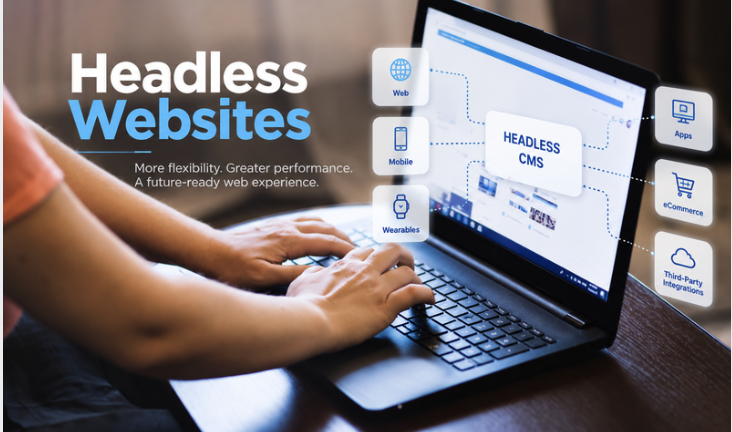
One of the most important choices is architectural. A traditional CMS combines content management with the presentation layer. A headless CMS stores and manages content separately and delivers it through APIs to websites, mobile applications or other digital channels. Hybrid models combine elements of both.
A traditional platform can be a strong fit when the organisation wants a relatively standard business website, marketing teams need visual page-building capabilities, and the site has limited omnichannel requirements. It can also reduce initial complexity when content and front-end requirements are closely connected.
A headless or composable approach becomes more attractive when content must serve multiple channels, front-end teams need greater freedom, or the organisation expects extensive integrations. The trade-off is that headless architecture normally requires more engineering discipline and integration planning. The detailed comparison of headless CMS versus traditional CMS is useful when evaluating whether that flexibility justifies the additional implementation effort.
The decision should be based on operating requirements rather than fashion. Choose the least complex architecture that can support the organisation’s realistic growth and integration needs.
Consider Content Operations, Not Just Content Features
A CMS can have powerful features and still create inefficient day-to-day work. The practical question is whether the people responsible for content can use the system consistently without relying on developers for ordinary publishing tasks.
Map the complete content lifecycle: idea, drafting, review, approval, publishing, updating and retirement. Larger U.S. organisations may need multiple roles, business-unit approvals or brand controls, while leaner companies may prioritise speed and simplicity.
Look for capabilities such as:
- reusable content components;
- clear roles and permissions;
- preview and staging environments;
- scheduled publishing and version history;
- structured metadata;
- workflow approvals;
- asset management.
Page count also affects content operations. A site with dozens of service, industry, location and resource pages can become difficult to govern if the CMS structure is weak. The guide to how many pages a business website should have provides useful context for planning information architecture before platform selection.
Assess Performance, Security and Technical Maintainability
CMS selection should include technical operating requirements from the beginning. A platform may look easy to manage during a demo but require substantial ongoing work once plugins, integrations, custom components and deployment processes are added.
For a U.S. Business Website, performance can be important when the audience is spread across multiple states and devices. Hosting architecture, caching, image delivery, front-end design and third-party scripts all affect responsiveness. The explanation of why website speed matters for businesses can help teams connect technical performance with practical business outcomes.
Security also needs an ownership model. Decision-makers should understand who is responsible for CMS updates, plugin or module reviews, access control, backups, monitoring and incident response. A platform with a large extension ecosystem can accelerate delivery, but every dependency also creates maintenance obligations. The guidance on protecting a website from cyber attacks is relevant when defining the controls that should sit around the CMS.
A CMS should make future change manageable, not merely make the first launch easy.
United States Considerations for CMS Selection
U.S. organisations often operate across large geographic markets, multiple business units and diverse customer segments. That can make scalability, governance and integration more important than the CMS choice appears at first.
A growing site may need to support state-specific landing pages, regional service information, franchise or branch content, multiple brands, local teams or different customer journeys. Rather than duplicating pages manually, organisations should assess whether the CMS can use structured content, templates and reusable components to manage variation efficiently.
U.S. companies should also consider how the platform fits the wider digital stack. A CMS that is difficult to integrate with CRM, analytics and sales or marketing systems can create manual work and inconsistent data even when its editing experience is strong.
For organisations planning a wider redesign, CMS selection should happen before major visual decisions are locked in. The overview of website redesign costs explains why architecture, migration and integration requirements can influence the scope more than surface-level design changes.
Practical U.S. Business Scenarios
The following scenarios illustrate how requirements can point to different CMS approaches. They are examples rather than client case studies.
Multi-State Professional Services Firm
A professional services company operating in several U.S. cities may need central brand control while allowing regional teams to maintain office pages, local expertise and events. Its business website would benefit from structured location content, controlled permissions, reusable templates and CRM integration. A traditional or hybrid CMS may be sufficient if the content is primarily web-based and marketing teams need strong editorial control.
SaaS Company With Product-Led Growth
A software company may need documentation, product pages, comparison pages, resource hubs, gated content and integration with product analytics and marketing automation. If content must also appear inside an application or partner portal, a headless CMS may offer more flexibility. The decision should still account for editorial usability and developer capacity.
Retail or Franchise Network
A retail or franchise organisation may need large numbers of local pages, promotions and store details. The platform requires consistent templates and reusable content models so teams can scale without manually recreating every page. Integration with location data, search, commerce or customer systems may be more important than advanced page-design flexibility.
These examples show why there is no universal answer to “which CMS should I use?” The correct answer changes with the organisation’s operating model, digital channels and technical resources.
Calculate Total Cost and Migration Risk
CMS pricing should include more than the subscription or licence. Decision-makers should estimate implementation, design-system work, migration, integrations, hosting, security, maintenance, training and future development.
Migration deserves particular attention. Moving an established business website means preserving valuable content, redirects, metadata, forms, analytics, integrations and search visibility while improving the platform underneath. If the project also includes a substantial rebuild, the benefits of custom website development can help clarify when a more tailored implementation provides enough long-term value to justify additional investment.
Compare three-year ownership scenarios rather than only initial project costs, including internal effort, external support and likely upgrade work. The cheapest CMS to purchase can become the most expensive platform to operate if it creates recurring technical friction.
Use a Structured Selection Process
A confident CMS decision can be made through a short, evidence-based process:
- Define business goals, audiences and required user journeys.
- Document content types, publishing workflows and governance needs.
- List required integrations and technical constraints.
- Decide whether traditional, headless or hybrid architecture is appropriate.
- Shortlist platforms that meet the essential requirements.
- Test realistic publishing and administration scenarios.
- Estimate implementation and three-year ownership costs.
- Assess migration complexity, security responsibilities and support.
- Select the option that provides the best balance of usability, flexibility, risk and cost.
Avoid allowing one stakeholder group to dominate the decision. Marketing may prioritise editing speed, developers may prioritise architecture, and finance may focus on licensing. The best CMS for business should balance these concerns against the organisation’s actual strategy.
How Dev Centre House Can Support CMS Selection and Delivery
Dev Centre House can support organisations that need to evaluate, design or implement a CMS around real business requirements. The work can begin with discovery and requirements analysis to clarify content workflows, integrations, technical constraints and future growth before a platform is selected.
For a U.S. focused business website, support may include CMS architecture, custom web development, API integration, content migration planning, performance engineering, security considerations and implementation planning. Where an existing platform is creating limitations, the team can also assess whether targeted modernisation, a redesign or a broader rebuild is the more practical path. The goal is to reduce uncertainty before significant budget is committed while keeping the technology decision tied to measurable operational needs.
Conclusion
Choosing the right CMS is ultimately a business architecture decision. The strongest option is the one that supports content teams, integrates with the wider technology stack, remains maintainable as requirements change and provides enough flexibility without unnecessary complexity.
For any Business Website, leaders should define the operating model first and compare platforms second. By assessing content workflows, architecture, integrations, performance, security, scalability and total ownership cost together, U.S. organisations can choose a CMS confidently and reduce the likelihood of another disruptive migration.
FAQs
1. What is the best CMS for business use?
There is no single best platform for every organisation. The right CMS depends on content workflows, integrations, scalability, security, internal capabilities and long-term ownership requirements.
2. How do I know which CMS should I use?
Start by defining business goals, content types, publishing roles, required integrations and expected growth. Then compare only platforms that satisfy those essential requirements.
3. Should a Business Website use a headless CMS?
A headless CMS can be useful when content must serve multiple channels or when front-end flexibility is important. A traditional CMS may be more efficient for simpler web-focused requirements.
4. Is WordPress always the best CMS for a website?
No. WordPress can suit many organisations, but customisation, security, integrations, governance and maintenance requirements should be assessed before choosing it.
5. How often should a company review its CMS?
Review the platform when business requirements, content operations, integrations, performance needs or maintenance costs change materially. Regular architecture reviews can reveal problems before they require a full migration.