Angular is one of the most powerful and popular frameworks for building dynamic and scalable web applications. Developed and maintained by Google, Angular provides developers with a comprehensive toolkit for creating efficient single-page applications (SPAs). If you’re new to web development or want to dive into Angular, this beginner’s guide will walk you through its […]
Angular is one of the most powerful and popular frameworks for building dynamic and scalable web applications. Developed and maintained by Google, Angular provides developers with a comprehensive toolkit for creating efficient single-page applications (SPAs). If you’re new to web development or want to dive into Angular, this beginner’s guide will walk you through its key features and help you get started on your Angular journey.
What is Angular?
Angular is an open-source front-end web application framework built with TypeScript. It provides a complete solution for developing web apps, including tools for routing, data binding, forms, HTTP communication, and more. Angular allows you to build complex web applications while maintaining clean, maintainable code.
Key Features of Angular
1. Two-Way Data Binding
One of Angular’s core features is two-way data binding. It allows for automatic synchronization of data between the model (business logic) and the view (UI). This means that any changes to the model are reflected in the view and vice versa without needing to write complex code.
Example:

In this example, changes made to the input field will immediately reflect in the paragraph text.
2. Component-Based Architecture
Angular uses a component-based architecture, which helps in building reusable, modular code. Every part of the UI is encapsulated into a component, making it easier to manage and scale your application.
A component consists of:
- HTML template (view)
- CSS styles (presentation)
- TypeScript class (logic)
3. Dependency Injection
Angular uses dependency injection to manage services and objects within your app. It allows you to inject services, components, or other dependencies directly into your components, which helps with modularity, testability, and maintainability.

4. Routing
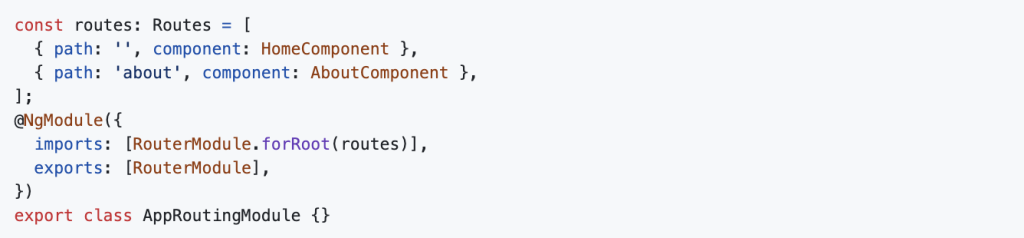
Angular provides a router that helps navigate between different views or pages in your application. You can define routes, pass parameters, and load different components based on the URL.
Example:
5. Forms Handling
Angular provides two types of forms: Template-driven forms and Reactive forms. Both offer ways to handle user input, validation, and submission effectively.
- Template-driven forms are simple and suitable for small applications.
- Reactive forms are more robust and ideal for large applications with complex validation.
6. RxJS and Observables
Angular heavily relies on RxJS (Reactive Extensions for JavaScript) for handling asynchronous operations. Observables are used to manage data streams, such as HTTP requests, user input, or events. They provide a powerful and declarative approach to handle asynchronous tasks.
7. CLI (Command Line Interface)
The Angular CLI is a powerful tool that helps developers create, build, test, and serve Angular applications. It allows you to generate components, services, and modules with ease, as well as automate tasks like running tests and building for production.
Example:
To create a new component:

To serve the app:

8. Built-in Directives
Angular comes with a set of built-in directives like ngIf, ngFor, ngClass, etc. Directives are used to manipulate the DOM (Document Object Model) or attach behavior to elements.
Example:

How to Get Started with Angular
Getting started with Angular is easy, thanks to the Angular CLI. Here’s a simple step-by-step guide to help you set up your first Angular project.
Step 1: Install Node.js and npm
Before you can start using Angular, you need to install Node.js and npm (Node Package Manager). These tools are essential for managing packages and running the Angular development server.
You can download and install Node.js from here.
Step 2: Install Angular CLI
Once Node.js is installed, you can install the Angular CLI globally using npm:

Step 3: Create a New Angular Project
After installing the CLI, you can create a new Angular project using the following command:

This will prompt you to choose some configuration options (e.g., routing, stylesheet format). After that, it will create a new folder with all the necessary files.
Step 4: Serve the Application
Once your project is created, navigate to the project directory and run the development server:

Your app will be available at http://localhost:4200/ in your browser.
Step 5: Build Your First Component
Once the app is running, you can start building components. Use the Angular CLI to generate a new component:

This will create the necessary files for the new component, and you can start editing it in src/app/my-first-component.
Step 6: Explore Angular Modules
Angular applications are organized into modules, which encapsulate related components, services, and other code. The root module is typically AppModule, but you can create additional modules for feature-specific functionality.
In your newly created app, you’ll see the AppModule defined in src/app/app.module.ts. You can import your new component here and start building your application.
Conclusion
Angular is a powerful and feature-rich framework for building modern web applications. By understanding its key features—such as two-way data binding, component-based architecture, and dependency injection—you can start building efficient and scalable applications.
To get started with Angular, use the Angular CLI to quickly set up a project, and explore the framework’s various tools and features as you build your first app.
Angular’s rich ecosystem, strong community support, and regular updates make it a great choice for developers looking to create high-performance web applications.
For more insights into Angular , visit Dev Centre House Ireland – Frontend Technologies Angular .